Free online study rooms with a shared Pomodoro timer
A Go PomoTimer study room is a free online space where everyone follows the same Pomodoro timer in real time. Create a room, send the link, and focus together like at a library table, from anywhere.
Last updated October 2026
What is an online study room?
An online study room is a shared space where people work at the same time, each on their own task, from wherever they are. Nobody needs to talk: the point is the shared rhythm. Everyone focuses together, takes breaks together, and can see that the others are working too.
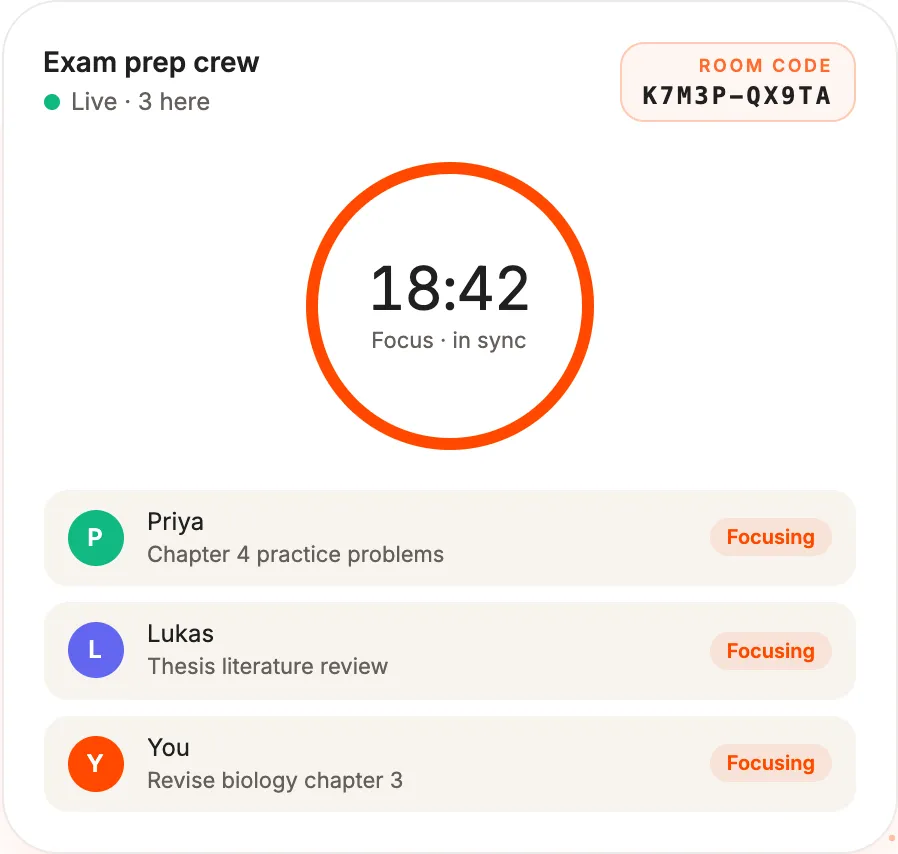
In Go PomoTimer, the room is built around one Pomodoro timer that everyone follows. There is no video, no microphone and no chat, just the timer, who is here and what each person is working on.
How to start a study room
- Click Study room at the top of any page, or the button above.
- Give the room a name. It uses the focus and break lengths from your timer settings, so set those first if you want something other than 25/5.
- Share the invite link or the room code with your friends.
- Friends open the link or type the code, enter a name and they are in. They don't need an account or an app.
What everyone in the room sees
- The same focus and break countdown, second for second.
- Who is in the room right now.
- Which task each person is working on, taken from the task they picked in their own task list.
- Shared controls: anyone in the room can start, pause, skip or reset the timer.
How the shared timer works
The room runs the classic Pomodoro rhythm: a focus session and a short break, three times, then a focus session and a long break, and around again. The lengths come from the settings of the person who created the room.
The timer runs on our server, not on anyone's phone. If you lock your screen or lose your connection for a moment, the room keeps going and you catch up as soon as you are back. A room closes by itself after 2 hours with nobody in it. Next time, just create a new one.
Ways people use study rooms
- Study groups: revise for the same exam, then use the breaks to quiz each other.
- Accountability partners: agree on a start time, open the room and both get going.
- Remote teams: a quiet co-working session, with everyone on the same rhythm and breaks at the same time.
- Working alongside someone: some people find it easier to start when they can see someone else working too. This is often called body doubling.
Your own extras inside a room
Everything you use on the main timer also works in a room, just for you:
- Lo-fi beats, with your own volume. Music plays only on your device, so others don't hear it.
- Your task list, so you can pick what you are working on.
- Full-screen focus mode, which shows just the room timer and your tasks.
- Keyboard shortcuts: Space to start or pause, F for full screen, N to add a task.
Privacy in a study room
To join, you only share a display name. Others in the room also see the task you picked, if you picked one. You don't need an account, and the room is removed after 2 hours with nobody in it. Anyone with the link or code can join, so share it only with the people you want in your room. The details are in our privacy policy.
Is it free?
Yes. Study rooms are free, have no ads, and neither you nor your friends need an account. Go PomoTimer is a small independent project, kept running by people who choose to buy us a coffee.
Do I need a camera or microphone?
No. Study rooms have no video, audio or chat. You only see the shared timer, who is in the room and their tasks.
Does it work on phones?
Yes. A room works in any modern browser on a phone, tablet or computer, with nothing to install. If your phone locks, the room timer keeps running on our server and you catch up when you come back.
Can we use 50/10 or other lengths?
Yes. A room uses the lengths from the settings of the person who creates it. To run a 50/10 room, set the timer to 50/10 first, then create the room.
Ready to study together?
Create a room in a few seconds and send the link to your friends.
